HoneySelect1 场景MOD安装启用教程
关于MOD安装方法 About the mod installation method
在您准备操作的时候,请您更新您游戏中的插件,阅读以下图片内容,在图片下的地址找到 插件 [Plugins_2025-01-15] 与 [HSResolveMoreSlotID_v1.5_Release] 程序进行覆盖游戏根目录进行安装.
When you are ready to operate, please update the plugins in your game, read the picture below and find the address under the picture Plugins [Plugins_2025-01-15] and [HSResolveMoreSlotID_v1.5_Release] programs to overwrite the game root directory for installation.
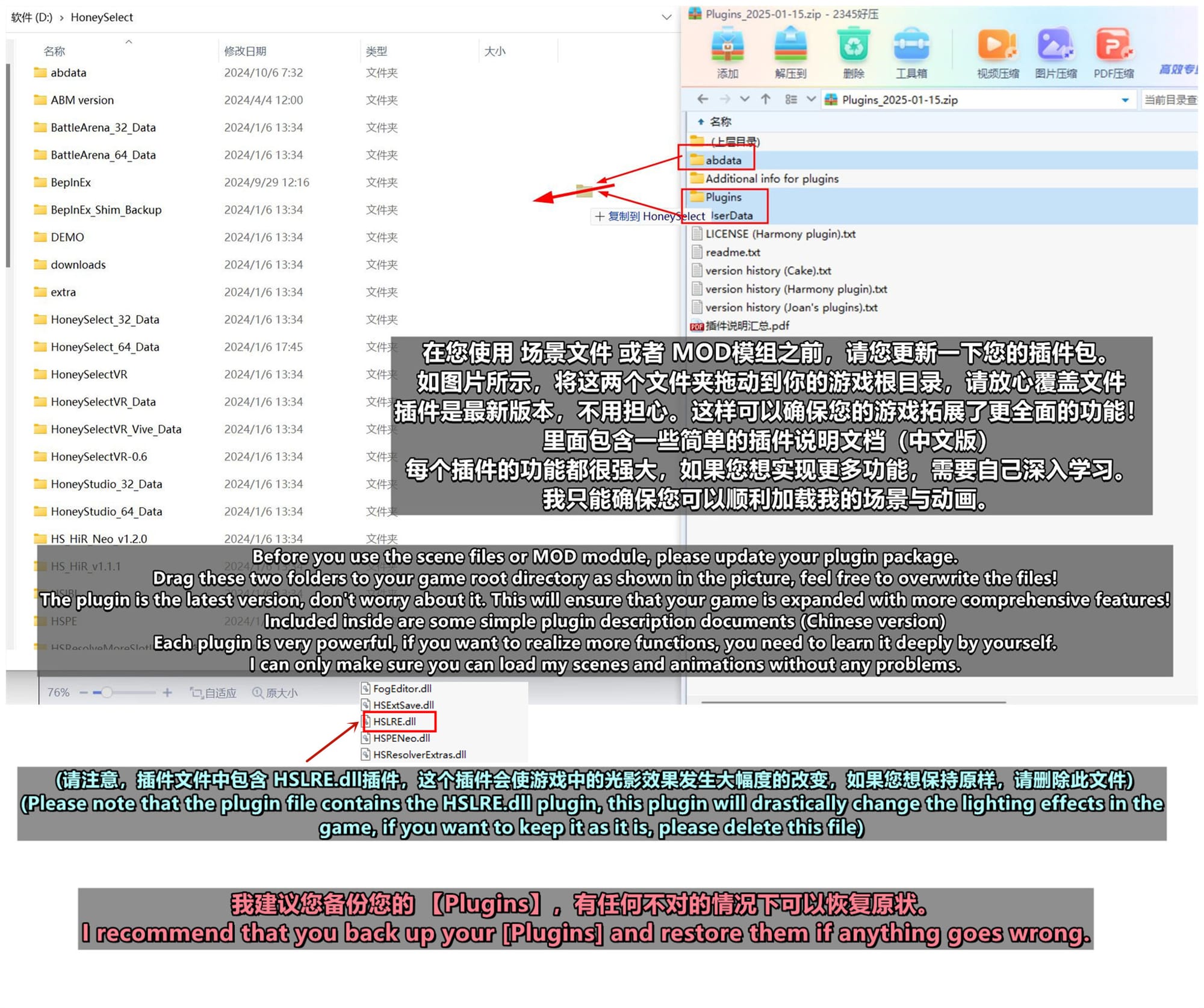
[Plugins_2025-01-15] ←Donwload
[HSResolveMoreSlotID_v1.5_Release] ←Donwload
ps: 您可以访问 此链接 ←里面介绍了插件的用法功能,他是大多数插件的制作者,感谢他的付出。
ps: You can visit this link ← it describes the usage of the plugin functions, he is the creator of most of the plugins, thank him for his efforts.
完成以上工作后进行下一步操作。
After completing the above, proceed to the next step.
①安装MOD方法 How to install MOD
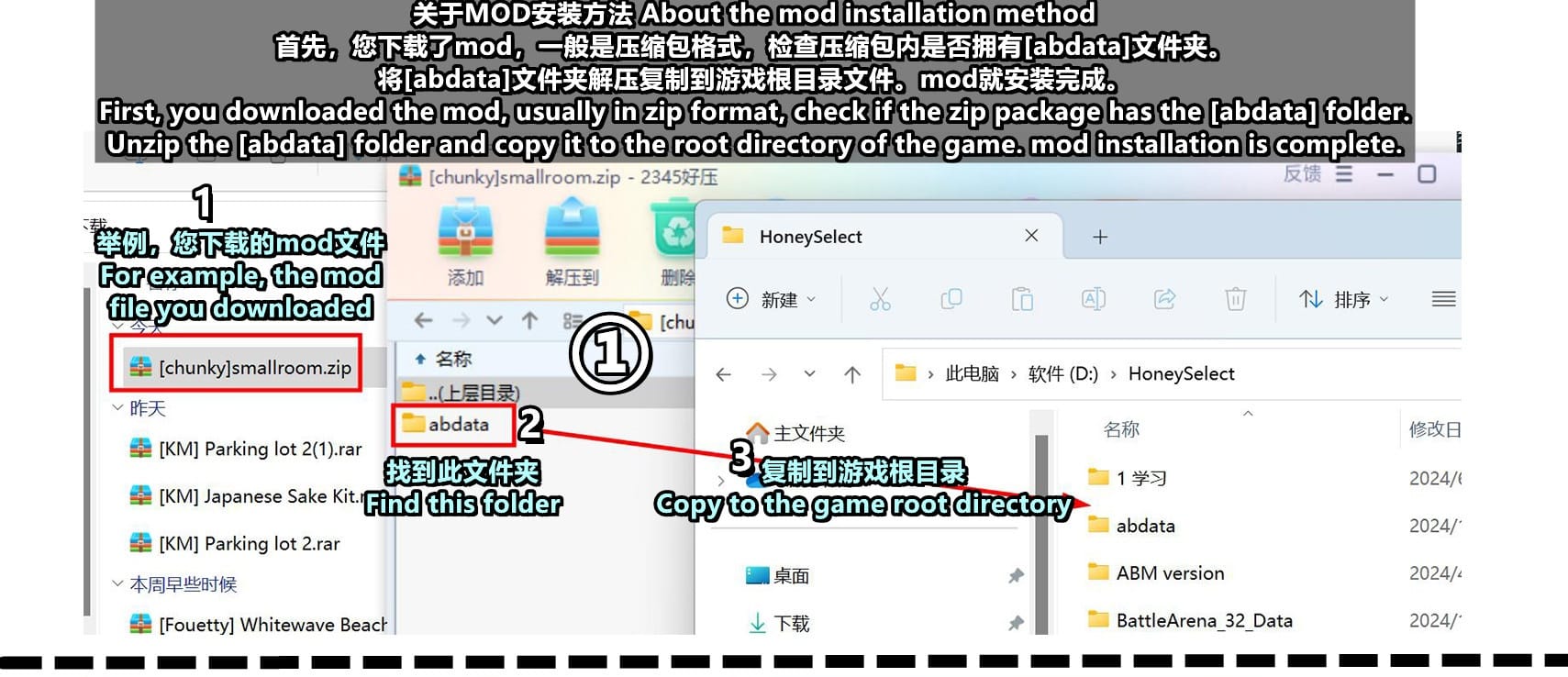
首先,您下载了mod,一般是压缩包格式,检查压缩包内是否拥有[abdata]文件夹。将[abdata]文件夹解压复制到游戏根目录文件。mod就安装完成。
First, you downloaded the mod, usually in zip format, check if the zip package has the [abdata] folder.Unzip the [abdata] folder and copy it to the root directory of the game. mod installation is complete.
[您可尝试下载此mod学习操作→ [chunky]smallroom.zip 此模组作者→链接地址 ]
[You can try to download this mod to learn how to do it → [chunky]smallroom.zip The author of this module → Link address]
②如何查找安装的mod. How to find the installed mod.
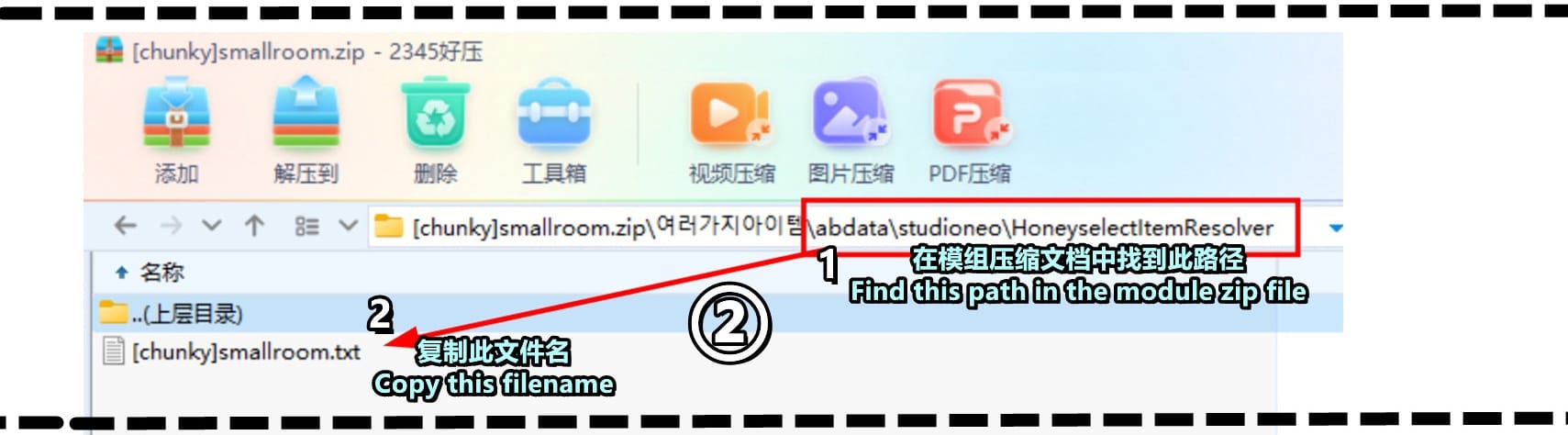
通过您下载的压缩包以下文件夹可以确认您的mod内容。
neo工作室地图物品mod在以下文件夹↓ 例如刚刚安装的mod
abdata\studioneo\HoneyselectItemResolver 复制 txt格式的此文件名 [chunky]smallroom 备用 (补充,如果您安装的是服装饰品mod,需要访问的是 abdata\list\characustom 此文件夹)
You can confirm the contents of your mod by looking through the following folders of the zip file you downloaded.
The neo studio map item mod is in the following folder ↓ For example, the mod you just installed
abdata\studioneo\HoneyselectItemResolver Copy this file name in txt format [chunky]smallroom Alternate (add, if you installed the clothing and accessories mod, you need to visit the folder abdata\list\characustom
this folder)
③如何使mod生效 How to make the mod effective
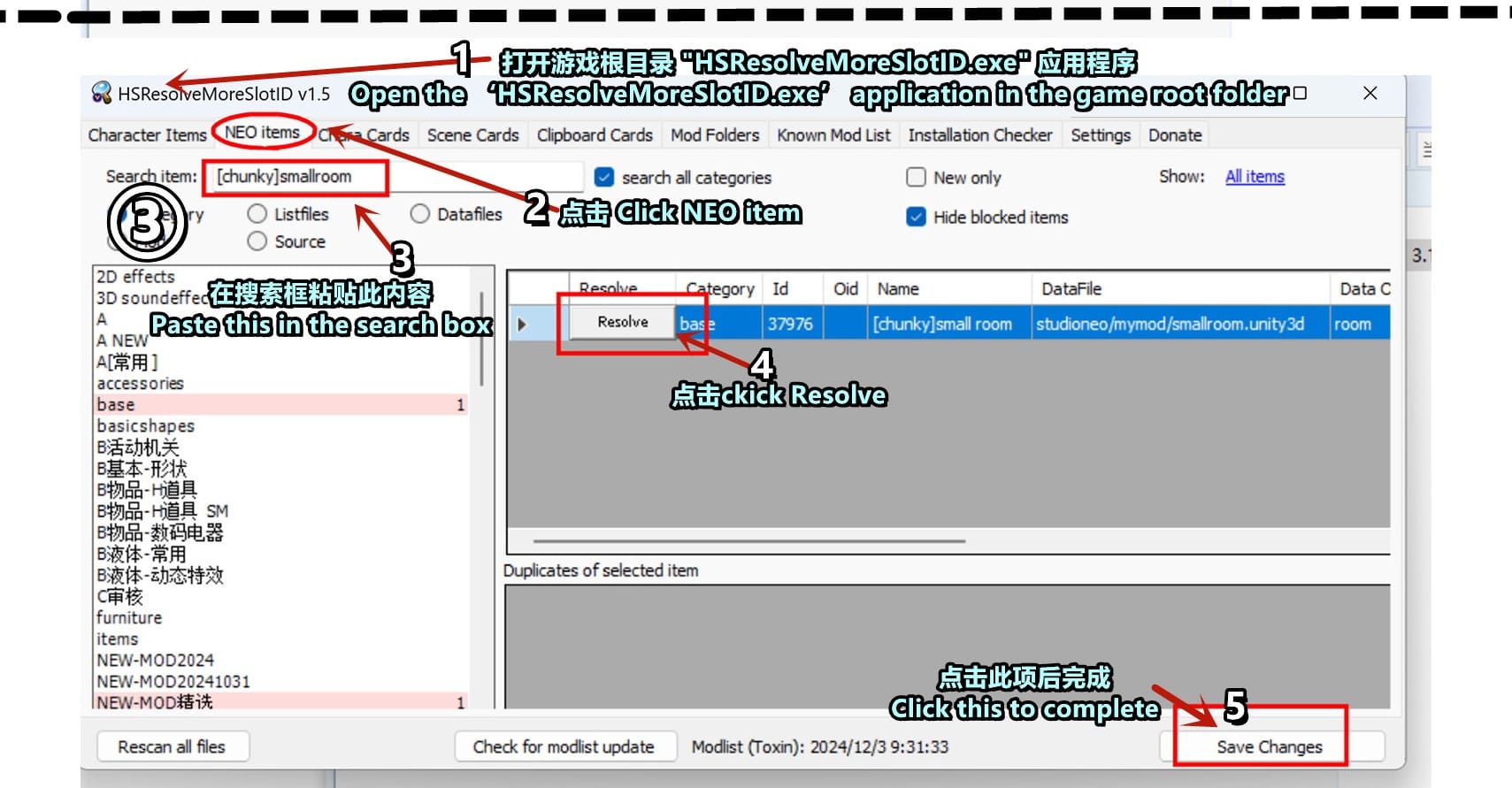
打开游戏根目录 "HSResolveMoreSlotID.exe" 应用程序
点击左上角的 [NEO items] 下载的地图道具选择这个选项。
如果您下载的是人物美化、服装饰品需要点击[Character Items]
在搜索框粘贴上一个步骤复制的txt文件名"[chunky]smallroom"
点击搜索结果中的Resolve按钮。
点击右下角的 "Save changes" 按钮
Open the game root directory "HSResolveMoreSlotID.exe" application
Click on [NEO items] in the upper left corner to select this option for the downloaded map props. If you are downloading character beautification, clothing accessories you need to click [Character Items]
Paste the txt file name you copied in the previous step "[chunky]smallroom" in the search box
Click on the Resolve button in the search results.
Click the "Save changes" button in the bottom right corner.
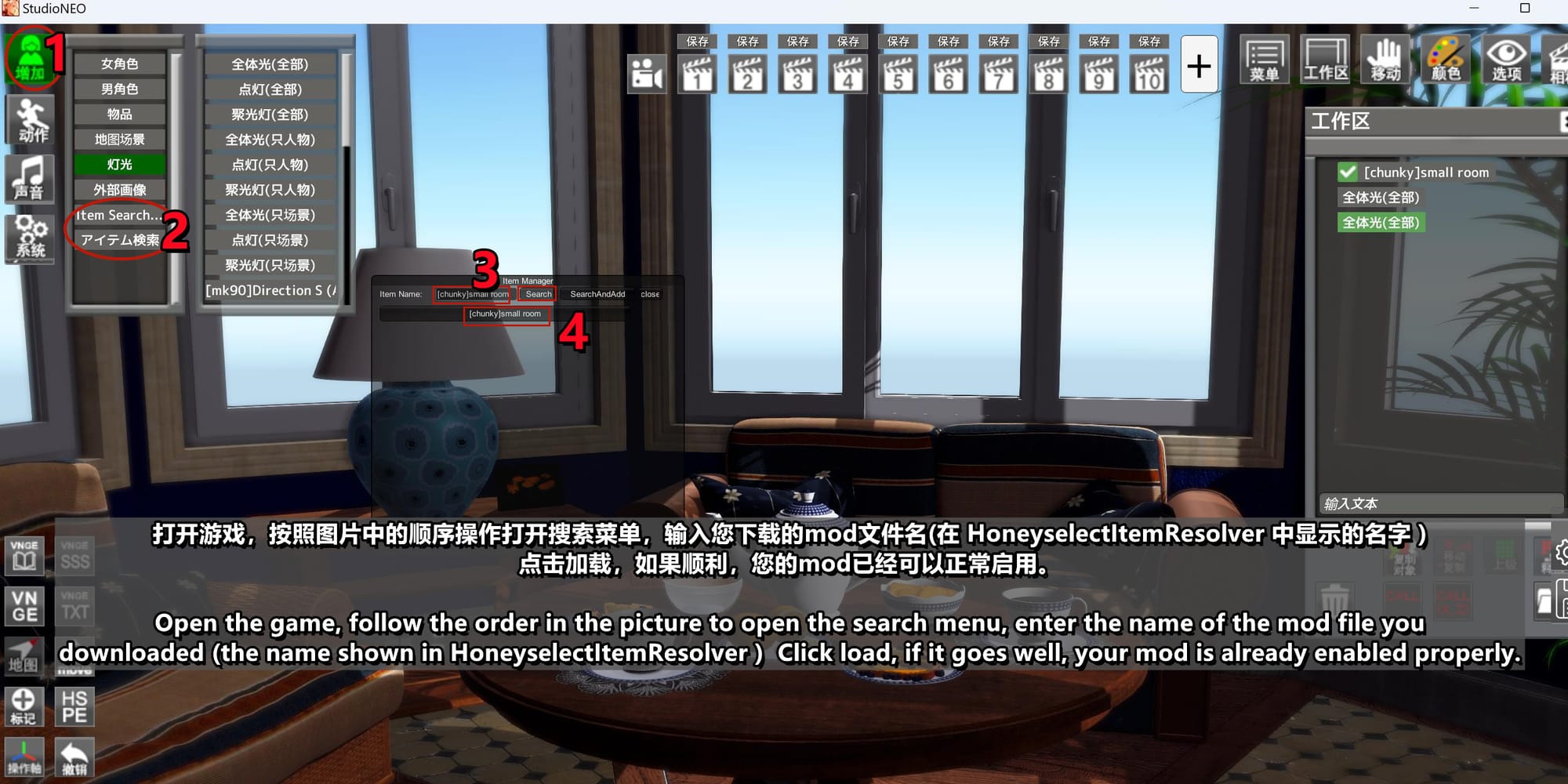
打开游戏,按照图片中的顺序操作打开搜索菜单,输入您下载的mod文件名(在 HoneyselectItemResolver 中显示的名字 )
点击加载,如果顺利,您的mod已经可以正常启用。
Open the game, follow the order in the picture to open the search menu, enter the name of the mod file you
downloaded (the name shown in HoneyselectItemResolver ) Click load, if it goes well, your mod is already enabled properly.
④如何处理安装场景文件中缺失的mod丨How to deal with missing modules in neo studio scene files
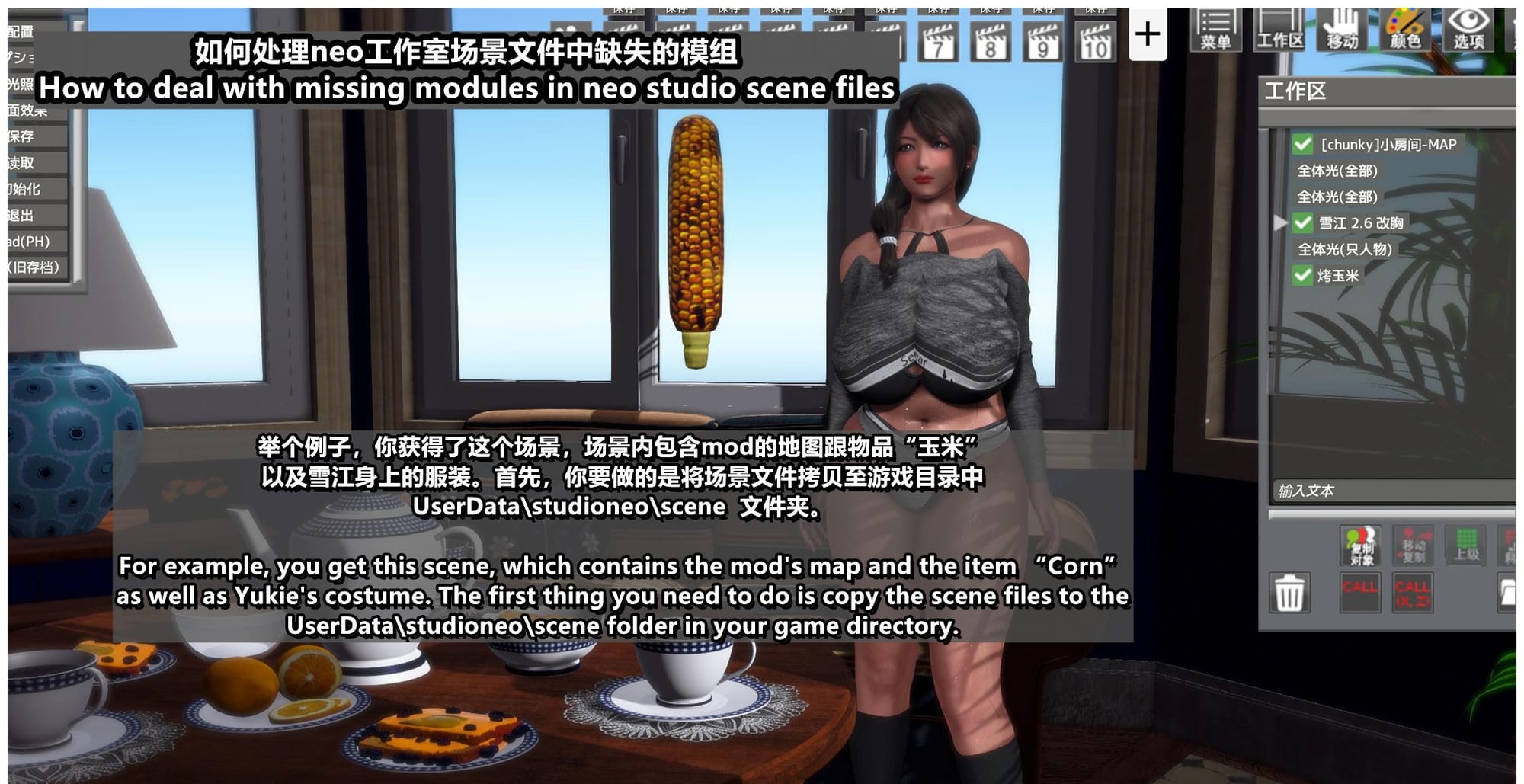
举个例子,你获得了这个场景,场景内包含mod的地图跟物品“玉米”
以及雪江身上的服装。首先,你要做的是将场景文件拷贝至游戏目录中
UserData\studioneo\scene 文件夹。学习用场景下载地址→ 点击

For example, you get this scene, which contains the mod's map and the item “Corn” as well as Yukie's costume. The first thing you need to do is copy the scene files to the UserData\studioneo\scene folder in your game directory. Download Scenes for Learning → Click
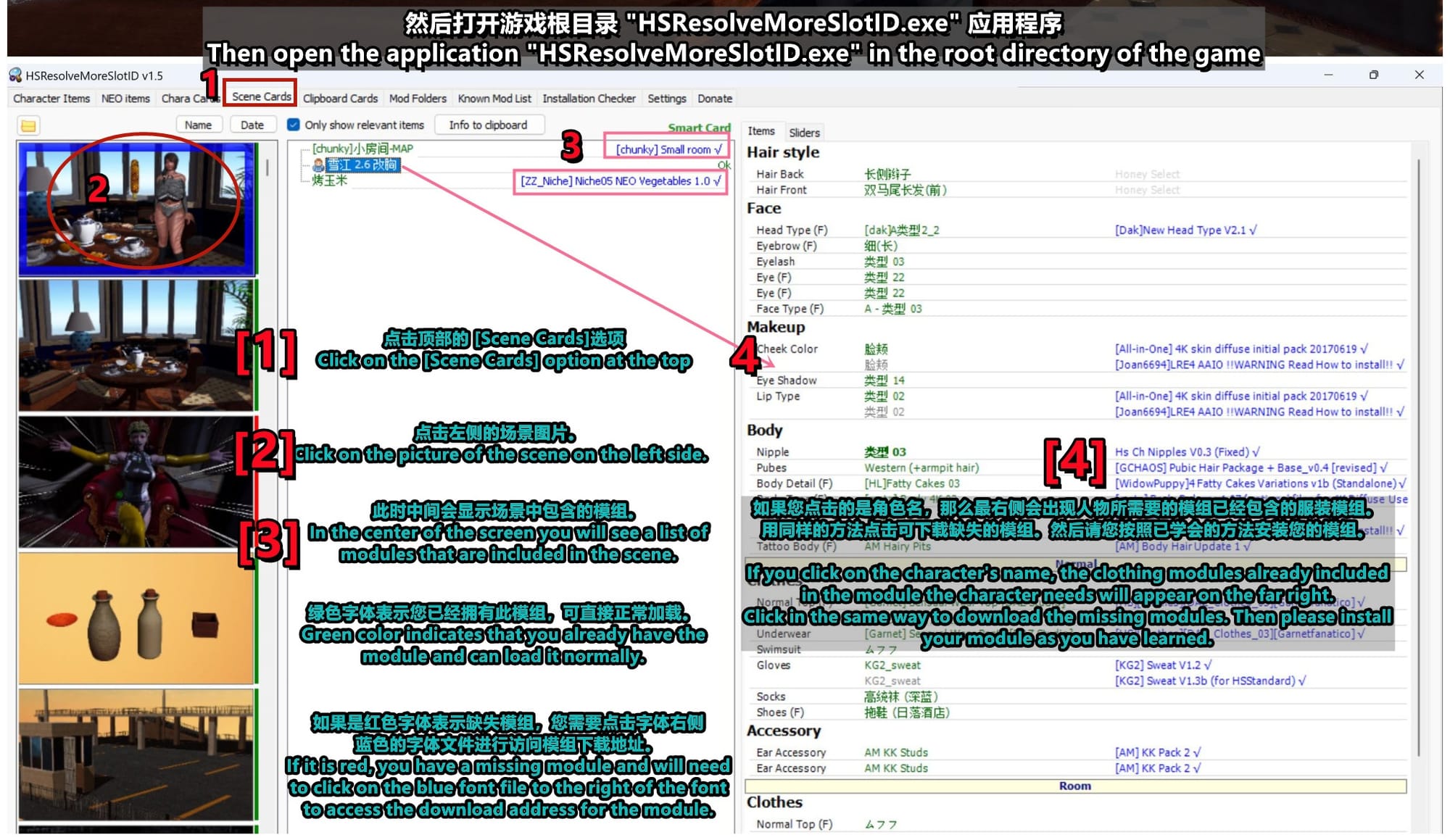
然后打开游戏根目录 "HSResolveMoreSlotID.exe" 应用程序
点击顶部的 [Scene Cards]选项
点击左侧的场景图片。
此时中间会显示场景中包含的模组。
绿色字体表示您已经拥有此模组,可直接正常加载。
如果是红色字体表示缺失模组,您需要点击字体右侧
蓝色的字体文件进行访问模组下载地址。
如果您点击的是角色名,那么最右侧会出现人物所需要的模组已经包含的服装模组。用同样的方法点击可下载缺失的模组。然后请您按照已学会的方法安装您的模组。
Then open the application "HSResolveMoreSlotID.exe" in the root directory of the game
Click on the [Scene Cards] option at the top
Click on the picture of the scene on the left side.
In the center of the screen you will see a list of modules that are included in the scene.
Green color indicates that you already have the module and can load it normally.
If it is red, you have a missing module and will need to click on the blue font file to the right of the font to access the download address for the module.
If you click on the character's name, the clothing modules already included
in the module the character needs will appear on the far right.
Click in the same way to download the missing modules. Then please install
your module as you have learned.
另外,如果模组文件名无法点击无法跳转,说明此模组已经取消分享。
在顶部右上角 [Settings] 选项中,[Modlist folder URL]选项内的链接可以下载到 [modlist.xml]这个文件,为最新的模组列表,手动下载完成后将此文件覆盖到游戏更目录,重新启动 "HSResolveMoreSlotID.exe" 应用程序可以加载最新的模组列表。
In addition, if the module file name cannot be clicked or jumped, it means that this module has been unshared. In the [Settings] option at the top right corner, the link inside the [Modlist folder URL] option can download the [modlist.xml] file for the latest module list, manually download it and overwrite this file to the game's new directory, and restart the "HSResolveMoreSlotID.exe" application. The latest module list can be loaded.
⑤让您完美使用我的场景与动画 Let you use my scenes and animations perfectly
请您参考此视频进行操作 Please refer to the video operation
【Video】 ← Donwload
学会了以上的内容,就可以尽情享受大部分场景了!
我推荐大家安装并启用“Plugins”目录下的 "HSLRE.dll" 插件。F5按钮可以打开此插件菜单界面,一开始学习很复杂,但是请尝试着调节,你可以获得一个全新的游戏画面。
Once you have learned the above, you can enjoy most of the scenes!
I recommend you to install and enable the “HSLRE.dll” plugin in the “Plugins” directory, the F5 button opens the plugin menu screen, it's a bit complicated to learn at first, but try to adjust it, you can get a new game screen.